Name the customer task.
A useful SaaS demo script starts with a specific person trying to finish a specific job. “Our platform has automation” is difficult to demonstrate. “A support lead needs to hand a ticket to the right person with the context intact” gives the recording a beginning and an observable result.
Write one sentence: For [audience], show how [product] helps complete [task], ending with [visible result]. List the necessary input, account state and product plan. The viewer should understand what the demonstration assumes.
| Story beat | What the viewer needs | What to show |
|---|---|---|
| Problem | A recognizable reason to watch | The starting situation |
| Proof | The steps that make the result possible | The actual interface and decisions |
| Result | A way to judge what changed | The final output or record |
| Action | A sensible next step | One destination or instruction |
A worked script for a real tool on this site.
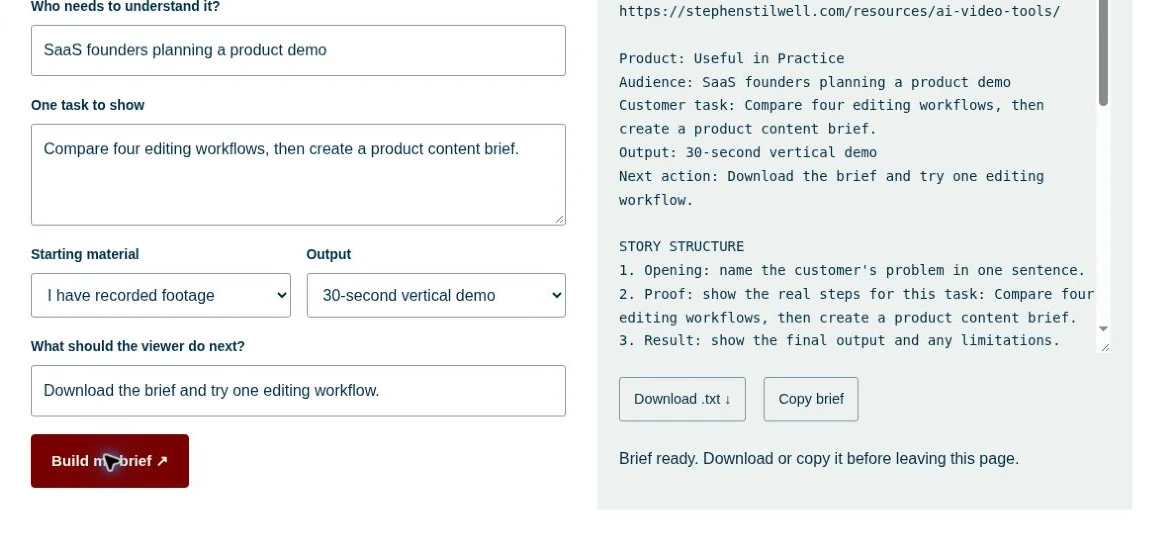
The example below explains the Useful in Practice brief planner. The planner was opened in a browser, completed and checked for text output on October 25, 2026. The script and approximate timing are proposed production copy; a video was not recorded.
| Starting timing | Spoken copy | On screen |
|---|---|---|
| 0–5 seconds | “Before you edit a product video, get clear on what it needs to show.” | A blank brief and the customer task |
| 5–15 seconds | “Start with your product and the person you’re making it for.” | Enter the product and audience |
| 15–35 seconds | “Choose one task, the footage you have and the format you need. Then write the action you want someone to take.” | Complete the task, material, format and next-action fields |
| 35–50 seconds | “Build the brief. You now have a story structure, a workflow to investigate and checks to agree before production.” | Show the actual generated text |
| 50–60 seconds | “Download the text and use it to plan your first edit. The planner is free to use without subscribing.” | Highlight Download, then the next step |
Read the script aloud while performing the steps. Adjust pauses, cuts and timing to the actual capture.
Write the screen direction beside the words.
A two-column script helps separate narration from evidence. For each sentence, identify the exact screen state or capture that supports it. Remove sentences that add a claim you cannot show or substantiate.
- Keep the interface readable. Plan the crop before recording. A full desktop may become unreadable in a vertical frame.
- Show the decision. Include the field, option or review step that changes the outcome.
- Preserve continuity. The output should follow from the input shown, even when the recording uses cuts.
- Mark illustrative material. Name fictional accounts or simulated records when that distinction matters.
Cut the tour down to a useful story.
For a shorter version, keep the problem, the decisive interaction and the result. For a longer tutorial, add prerequisites, an exception and a recovery step. The goal is enough detail for the audience’s next decision.
Test the script with someone who has not helped write it. Ask what the product did, who it was for and what they would do next. Their answer is more useful than asking whether they liked the video.
Once the script is clear, use the Cardboard vs. Vyra comparison brief to evaluate the editing workflow. If another creator will produce the content, attach the script to a SaaS UGC brief.