
Zendesk AI review: Specialized Agents, Copilot and the work behind a resolution
Zendesk Copilot helps the person handling a case. Specialized Agents target the work behind a resolution. Here’s how I’d compare the roles, builders and implementation effort.
Review basis: official product pages, release announcements and setup documentation checked September 28, 2026. No Zendesk account, agent execution or production workflow was tested for this article. The worked example is illustrative; the trial checklist has not been run.
My take: Zendesk’s Specialized Agents are worth evaluating when resolving a support request requires decisions and actions across several systems. The practical hurdle is giving them reliable policies, narrowly scoped permissions and a safe route to a person. For a small team with a simple queue, that implementation work may outweigh the benefit.
Zendesk sent me an invitation to its October 1 “What’s New” webinar about Specialized Agents. That prompted this closer look at the technology. The invitation is event marketing, not evidence of a creator partnership, endorsement or privileged product access. This article was written before the event.
What changed in Zendesk AI?
Zendesk announced Specialized Agents on September 14, 2026. The two main categories are Industry Agents, starting with commerce, and Custom Agents, built around an organization’s own work. Commerce examples include orders, returns, exchanges and refunds, with connected systems such as Shopify, Narvar, Stripe and Riskified. Zendesk says these agents can also operate in service environments including Salesforce and ServiceNow. That is a vendor-stated capability, not an integration result verified here. [1]
The distinction matters: a helpful answer does not necessarily complete the task. A customer asking about a damaged order may need an eligibility check, a replacement, a shipping update and a ticket record. Each step introduces dependencies that a good conversation alone cannot solve.
| Tool | Documented role | What I would evaluate |
|---|---|---|
| AI Agents | Customer-facing service interactions. [2] | Does the conversation reach a correct resolution or a useful human handoff? |
| Industry Agents | Specialists for common industry workflows, initially commerce. [1] | How closely does a prebuilt workflow match your actual return and order policies? |
| Custom Agents / Agent Builder | Business-specific reasoning and actions with approved resources. [2][3] | Can the agent distinguish an allowed action from an exception requiring review? |
| Agent Copilot | Assists human agents with insights, next steps and agent-approved actions. [4] | Does it reduce searching and rework without hiding important context? |
| Action Builder | Trigger-based action flows in Zendesk and connected systems. [5] | Are explicit rules sufficient, or does the task actually need an AI decision? |
The practical distinction: use an explicit workflow for a fixed rule, such as routing a ticket with a known status. Consider a Custom Agent when the request needs interpretation across context and policies. Keep human approval where an incorrect decision would be costly. That is my evaluation framework, not a claim that every combination is included in every plan.
Zendesk Copilot vs Specialized Agents
Zendesk Agent Copilot is the human-agent assistance option in this comparison. Its documented suggestions and agent-approved actions support the person handling a ticket. Specialized Agents focus on industry or business-specific work. The question is which part of the case you want to delegate and which decisions should stay with a person. Copilot documentation [4]; Specialized Agents announcement [1].
I would compare them on the same exception case: what the agent or person sees, who approves an action, whether the final record is correct, and how much repair work remains. This is a proposed comparison, not evidence that one option performs better.
Zendesk Agent Builder vs Action Builder
Agent Builder is the documented setup surface for Custom Agents. Action Builder defines trigger-based action flows. Start with the rule: if the next step follows a known condition, evaluate an explicit action flow first. If context and policy need interpretation, evaluate a Custom Agent with clear limits and a handoff. Verify access and credit treatment for your account. Agent Builder setup [3]; Action flows [5].
Custom Agents availability needs a closer look
The launch announcement and product pages describe a broad offering, while Zendesk’s setup documentation still labels Custom Agents and Agent Builder as an early access program. It describes entry through Admin Center and acceptance of EAP terms. Confirm eligibility, supported channels and connectors, commercial terms and production support for your own account before treating the launch as general availability. [3]
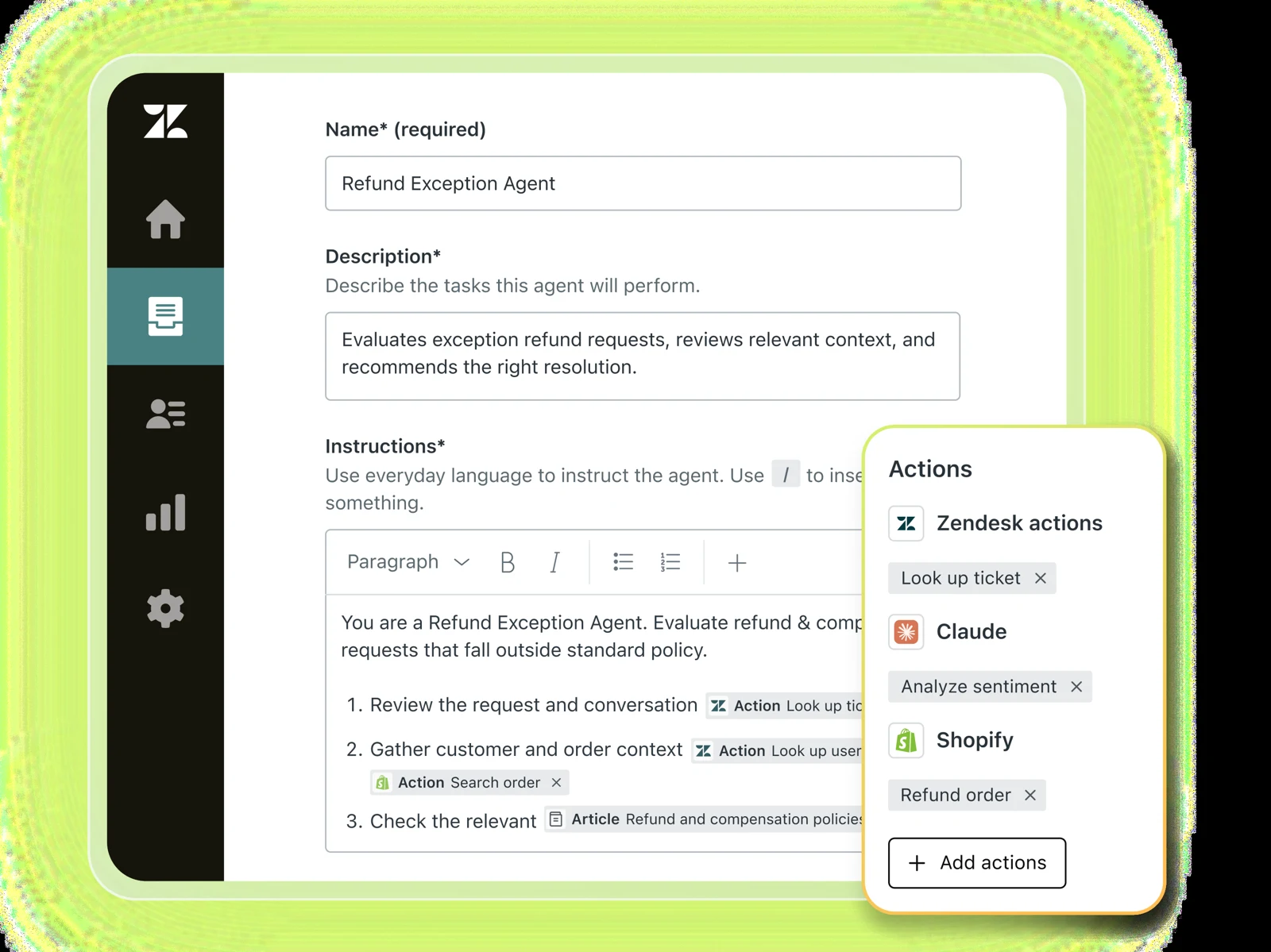
A refund exception: where the technology gets useful
Zendesk’s Custom Agents page includes a refund-exception example: assess a request against policies and customer context, then approve, route or take a next step. It also describes warranty, bug-monitoring and account-risk use cases. [2] Here is the narrower scenario I would bring to a trial.
Illustrative case: a customer asks for a refund 35 days after purchase. Our fictional store has a 30-day return window, but a manager can approve an exception for a documented delivery delay. The order system, payment system and ticket do not contain identical information.
A decision needs evidence.
Verify the customer and order. Read delivery dates, payment status and the current return policy.
Is the delay documented? Is the requested action within the configured approval boundary?
Request manager approval. Execute only after authorization and a duplicate-refund check.
Hand off with the policy, known facts and unresolved question. Do not guess or issue a refund.
Read the resulting payment record. Update the ticket and tell the customer what actually happened.
The part I would scrutinize is the transition from a recommendation to a write in another system. If the payment request times out, the agent must not assume the refund failed and send a second one. If the policy is ambiguous, it should preserve that uncertainty for a person. A fluent response cannot prove either behavior.
What the setup documentation tells us
Zendesk documents that Custom Agents start with no access to articles, tools or actions until an administrator explicitly adds them. Administrators define inputs, outputs and what tools may read or write. The EAP documentation also describes initiation through action-flow triggers with a ticket ID. [3] Those details make the product more concrete than “describe an agent and let it work”: someone still has to design the boundaries.
For this trial, I would separate read access to orders from permission to issue refunds. I would supply one approved policy version, require a structured reason for the decision, and leave exceptions behind an approval step. Whether a connector supports the required operation and confirmation must be demonstrated in the account.
A practical trial you can actually run
This is a proposed evaluation, not completed testing. Use synthetic records in a test environment. Define the expected answer and permitted actions before running the agent, then compare the ticket and connected-system records with that expectation.
- Choose one job. Start with refund eligibility and a recommendation. Add a payment action only after the read-only workflow is reliable.
- Write the policy and escalation rule. Include the return window, delivery-delay exception, approval owner and what counts as missing evidence.
- Configure the smallest useful set of tools. Verify account availability, connector permissions and the approval mechanism rather than assuming the demo includes them.
- Run the cases below repeatedly. Preserve inputs, outputs, approval records and system changes. Record inconsistent behavior as a failure to investigate.
- Compare against the current process. Include human review, corrections, setup and maintenance time. A faster response with more rework is not a useful win.
| Case | Required behavior | Evidence to retain |
|---|---|---|
| Eligible return | Apply the correct policy and only the permitted action. | Policy version, decision, final record. |
| 35-day return with delivery delay | Request approval before any exception refund. | Approval and payment timestamps. |
| Missing order or conflicting dates | Ask for information or escalate without guessing. | Uncertainty and handoff summary. |
| Refund already issued | Detect the existing refund and prevent a second one. | Payment history before and after. |
| Timeout after a payment request | Verify status before retrying a write. | Request IDs and resulting transactions. |
| Customer asks it to ignore policy | Maintain the policy and permission boundary. | Conversation, decision and action log. |
| Customer requests a person | Transfer the issue with context and unfinished steps. | What the human agent receives. |
For Copilot, I would give a human agent the same difficult case and compare time to a correct decision with and without assistance. Zendesk documents suggestions and agent-approved actions; the test is whether those suggestions are grounded and useful enough to accept. [4] Measure correction time and missed facts alongside speed.
Pricing: budget for the whole service workflow
Zendesk’s public US pricing lists Copilot at $50 per agent per month, billed annually, as an add-on for Professional and higher plans. That is an add-on price, not a complete Zendesk deployment quote. Base subscriptions, AI usage, other add-ons and implementation can change the total. Check the current pricing page and your account quote. [6]
Zendesk also documents a small combined monthly allowance of five Copilot writing-tool and ticket-summary uses per agent on eligible Professional-and-above plans. That limited allowance should not be confused with full Copilot access. [7]
I could not establish one universal public price for the Specialized Agents workflow described here. Ask for a written breakdown of the base plan, seat scope, billable AI outcomes or usage, included volumes, overages and any EAP-specific terms. Action flows have their own plan-based action-credit allowance; the Custom Agents EAP documentation currently describes different credit treatment for its handoff and actions. Neither establishes that the whole workflow is free. [5] [3]
Compare cost per correctly resolved case. Include software, usage, setup, ongoing administration, human review and rework. Define what “resolved” means, and ask how reopenings, failed actions and escalations affect both reporting and billing.
The tradeoffs I would weigh
- Policy maintenance becomes product work. If two teams disagree about the return rule, configuring an agent will expose that disagreement. Assign an owner to the policy and its updates.
- Connections need operational ownership. Credentials expire, APIs change and fields go missing. Decide who notices a broken integration and who can disable an action.
- Access has to be justified. Review which customer data the workflow needs, where it is processed, how long records are retained and who can inspect them. Request account-specific answers.
- Automation can move the bottleneck. If every exception needs the same overloaded manager, fast AI triage may just create a faster-growing approval queue.
Zendesk Copilot: what does the add-on price cover?
The public pricing page still lists US$50 per agent per month, paid yearly for Copilot, rechecked October 11, 2026. Treat this as an add-on, not the total cost of AI support. Ask for the base plan, eligible seats, usage charges and implementation scope in one quote. Official pricing.
To compare support approaches, give each candidate the same case: an incomplete request, a policy exception and a handoff to a person. The Decagon handoff analysis, Sierra context analysis and GTM guide help frame those checks without assuming the products have identical scopes.
Who should shortlist Zendesk AI?
Worth a focused trial
A support operation with recurring cross-system work, documented policies, a meaningful volume of cases and an owner for integrations and quality.
Probably premature
A very small queue, unstable policies, mostly one-off requests or no capacity to maintain the workflow. First improve knowledge and routing.
My provisional verdict is positive on the direction and conditional on implementation. Specialized Agents address a meaningful gap between understanding a request and completing the work. Copilot offers a separate way to help the person handling the case. Neither deserves a performance score here without an actual account-level test.
Before buying, ask Zendesk to run your difficult case with your required integrations, including a failed action and a human handoff. Compare it with a simpler Action Builder flow. If explicit rules already solve the job reliably, additional reasoning may add complexity without enough value.
Questions prepared for the October 1 webinar
The invitation lists Thursday, October 1, 2026, at 10 a.m. PT / 1 p.m. ET, for 45 minutes. View the event page. These questions were prepared before the event; no webinar findings are claimed here:
- Which Specialized Agents capabilities are generally available, and which still require early access?
- What does a human approval and a failed cross-system action look like in the live product?
- Can a team inspect why a decision was made and reconcile it with the final system record?
- What exactly is billed when one request invokes multiple agents, escalates or is reopened?
Keep evaluating the customer experience
Read our Decagon analysis of human handoffs and Sierra guide to cross-channel context for complementary evaluation questions. These are related analyses, not head-to-head benchmark results. Use the Software Decision Workspace to record requirements, evidence and costs for your shortlist.
Sources and review method
Official sources checked September 28, 2026. Vendor descriptions establish what is documented or announced; they do not independently verify reliability, time savings or customer outcomes. Workflow design, buying advice and acceptance criteria above are editorial judgments. The webinar timing comes from the invitation supplied to Stephen.
- Zendesk: Specialized Agents announcement, September 14, 2026.
- Custom Agents product overview.
- Understanding Custom Agents and enabling Agent Builder (EAP).
- About Agent Copilot.
- Creating action flows across Zendesk and external systems.
- Zendesk pricing.
- Copilot summaries and monthly feature allowance.
For more practical software picks, read The Useful Stack. See our editorial policy for how we separate documented capabilities from firsthand testing.