The workspace.
Seven-stage planning, starter drafts, prospect tracking and exports. Use it whenever a browser-based starting point is enough.
Open the free workspace →For solo founders and small service businesses: choose your first audience, shape an offer, prepare the campaign, and decide what to test next.
Preview only. Live purchases are not open yet.
No subscription, required AI credits or customer account.
Loopback is a fictional teaching example. The target is a decision rule, not a promised result.
Seven-stage planning, starter drafts, prospect tracking and exports. Use it whenever a browser-based starting point is enough.
Open the free workspace →Expanded worked launches, standalone editable templates, campaign assets, an offline planner and a deeper experiment workbook. Use it to build your own reusable launch system.
Inspect the paid toolkit files ↓All existing free tools and exports stay free. The paid kit adds working material; it does not unlock the free workspace.
The paid kit is a set of editable files you keep. Inspect the real planner and workbook, then read excerpts from a blank template and a completed example. The examples and numbers are fictional teaching material.
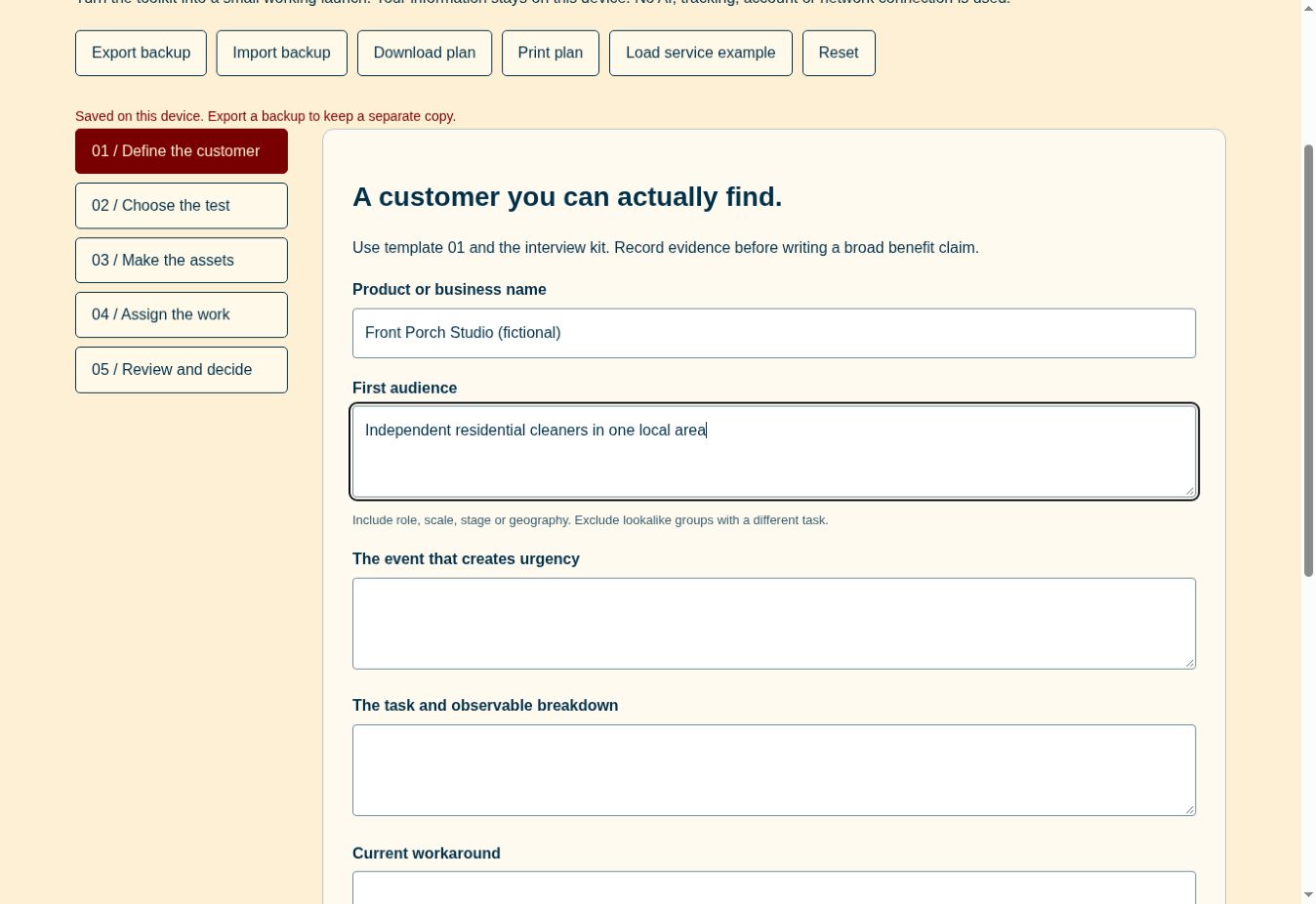 Enlarge the actual planner preview →
Define the customer, choose a test, review assets, assign work and record the result. Opens in a desktop browser; export backups to keep your work.
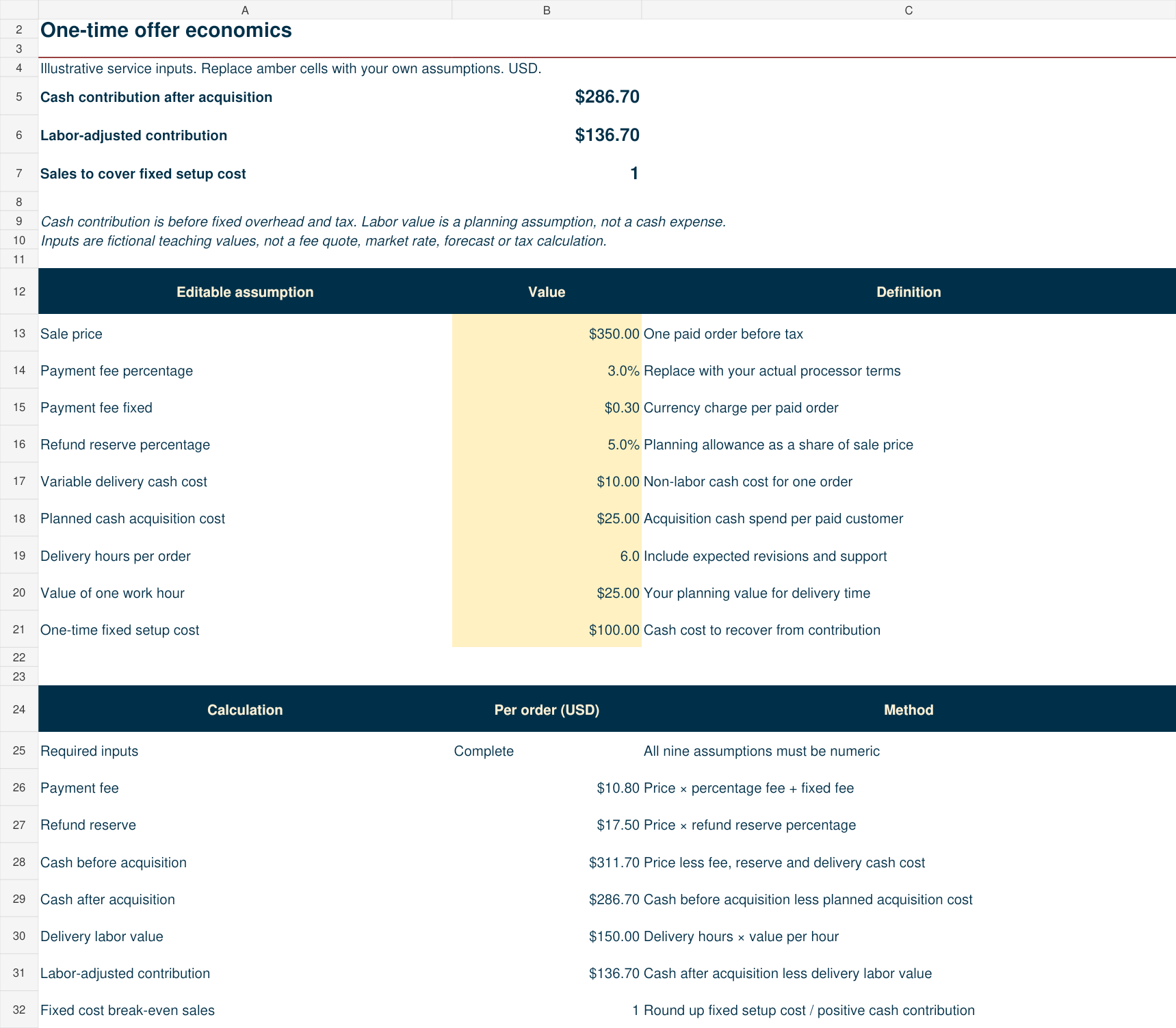 Enlarge the actual workbook preview →
A 20-experiment log and an offer economics model. Separate cash contribution from the value of your time. Use Excel, LibreOffice or compatible spreadsheet software.
templates/05-experiment-card.md · actual excerpt
# Experiment card
Create this before you publish. Output: an interpretable test with a bounded cost.

## Decision this experiment should inform
Should we [specific decision]? The biggest assumption is [one].

## Test design
- ID and owner: [E01 / name]
- Start and end dates: [dates]
- Audience and eligibility: [same definition throughout]
- Channel: [one]
- Offer and price shown: [exact]
- Asset version and URL or file: [version]
- Single changed variable: [audience / message / price / channel / workflow]
- Variables held constant: [list]
- Exposure unit: [one definition]
- Primary outcome: [qualified conversation / completed trial / paid customer]
Edit the plain-text document in your own editor. The complete template adds outcome tracking and a review decision.
examples/01-loopback-saas-launch.md · actual excerpt
Duration: 14 days. Audience: 15 eligible product leads, with one delivered message per person. Main variable: problem-led message. Offer and sample remain constant. Primary outcome: completed walkthroughs where the person performs the source-check task. Planning threshold: two completed eligible walkthroughs and at least one request to try a second sample. Stop if the founder reaches ten hours without producing useful feedback. These thresholds are chosen learning rules, not expected conversion rates.
The complete fictional SaaS example connects this experiment to its audience, offer, campaign copy, schedule and illustrative review. A local-service launch is also included.
24 files in one ZIP, including guides, campaign copy, three editable SVG layouts, license and contents list. Plain Markdown documents, XLSX workbook and HTML planner. No native Canva or Notion template library is included.
You can write another post, open another spreadsheet, or ask AI for another strategy. The difficult part is connecting the decisions: who needs this, what you can prove, where to reach them, and what evidence would justify your next week of work.
This kit helps you build that chain. It is designed for a small launch with limited time and money, before you commit to a bigger campaign.
Best fit: a founder with an early B2B product, or a small service business shaping its first focused offer. Bring one idea and a few hours to work through it. Customer conversations and launch activity happen outside the kit.
It provides a working process and editable assets. It does not provide leads, automated outreach, consulting, product-market fit, or guaranteed sales.
One ZIP, with openable files and a clear starting point. You can use the kit without paying for another tool.
Try our free launch workspace first →Editable working documents for customer discovery, positioning, offer design, channel selection, launch planning and review. Clear instructions connect each document to a decision.
Follow a fictional SaaS launch and a fictional local-service launch from hypothesis to campaign. See how limited evidence changes the plan, with examples you can adapt.
Adapt landing-page copy, outreach, follow-ups, launch emails, social posts and a demo outline. Blank starting points sit alongside completed examples.
Plan budget and activity, record outcomes, and inspect conversion and break-even assumptions. Editable spreadsheet inputs make the tradeoffs visible.
Open the included HTML planner in your desktop browser. Save locally and export your decisions. No account, API key or connection to an AI service required.
Switch examples to explore the kind of connected thinking the toolkit develops.
A product lead has support messages and sales notes, but cannot trace a prioritization theme back to its source.
Discovery question: “Walk me through the last time you grouped customer feedback. Where did the original notes end up?”
First asset: A short synthetic-data walkthrough showing source-linked feedback themes.
Invite 15 eligible product leads to a synthetic-data walkthrough. Seek two completed walkthroughs and one request for a second sample.
If interest is weak, inspect the problem and offer before building more features or buying ads.
These examples demonstrate a method. They are not client work, testimonials, or measured campaign results. The included files contain the expanded working material.
Choose one audience, a real workaround and an offer. Separate evidence from assumptions. Use the discovery templates to plan conversations.
Choose one channel, adapt the campaign assets, set a time and cash budget, and define a review date.
Record actual responses in the workbook. Use the review to continue, revise or stop. Real validation takes contact with customers.
The download is for one buyer to use in their own business and client projects. Edit the templates, share adapted launch plans with your team or project client, and keep the files. No resale or redistribution of the toolkit itself.
Built by Stephen Stilwell, creator of Useful in Practice, with a background in product ownership, business development, systems engineering and practical software education.
Preview stage. Live purchases are not open yet. You can inspect the toolkit files and use the free workspace today.
Ask a product question · Discuss a separately scoped content project
Save a small recovery file before checkout. After a successful payment, download the toolkit ZIP here, extract it and open START-HERE.html. Keep both files. The recovery file lets you return on another computer. The toolkit is not sent as an email attachment; if confirmation is delayed, keep the page open and do not pay again.
Open the recovery file in any text editor, copy the line labeled “Private key,” and paste the key on the download recovery page. If you lose that file, email Stephen from your checkout address with your receipt details. He verifies the purchase before restoring access. Never send card numbers or security codes.
A desktop browser for the offline planner, a Markdown-compatible text editor for editable documents, and Excel, LibreOffice or a compatible spreadsheet application for the workbook. No paid AI account is required. Mobile is suitable for reviewing the site; editing the full kit is easier on a computer.
A full refund requested within 14 calendar days of purchase, including if the files cannot be used as described. Contact Stephen with your order details. Mandatory consumer rights remain unaffected. This policy is a draft until launch approval.
You make decisions, conduct research, edit claims and send messages. The toolkit provides structure and reusable files. It does not browse for leads, run an AI model, send email, or guarantee results.