THE COMMENT IS CLOSED. IS THE FRAME RIGHT?
Clueso AI v2.
Check the finished edit.
Clueso AI v2 turns review comments into editing instructions inside a collaborative video editor. For a small team making product videos, the useful question is what changed in the scene, and what stayed intact around it.
NOVEMBER’S V2 RELEASE
From leaving feedback
to asking for the edit.
Clueso is a business-video editor for making explainers, demos and training from material such as recordings, documents and scripts. Its November 18 v2 announcement describes AI agents that act on comments and reply with the changes made. The changelog lists v2 on November 13; November 18 is the announcement date, not a verified first-access date.
The company also describes selecting an element for a targeted prompt, bulk changes, parallel agents and manual collaboration in the same editor. These are vendor claims, not verified results from a trial here.
The fit is a founder, product marketer or customer-education team whose bottleneck is the revision round. They know what the video needs to say, but each reviewer’s note creates another small production task. Clueso’s proposition is to move those tasks into a conversation without abandoning an editable project.
THE DEVELOPMENT, PRECISELY
Comments are older.
The proposed handoff is new.
Clueso’s changelog already recorded comments in January. This release’s interesting claim is the link from feedback to agent execution and a written reply. Our Pexo note explored directing a revision; our VEED note separated generated scenes from product evidence. Here the boundary is between a comment being answered and its acceptance condition appearing in the finished video.
THE PRODUCT IN VIEW
The reply sits
beside the scene.
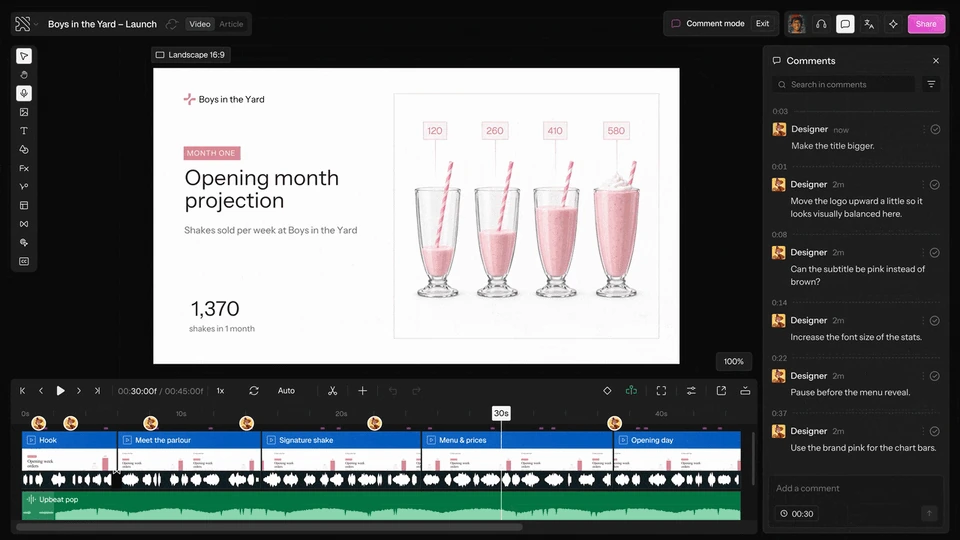
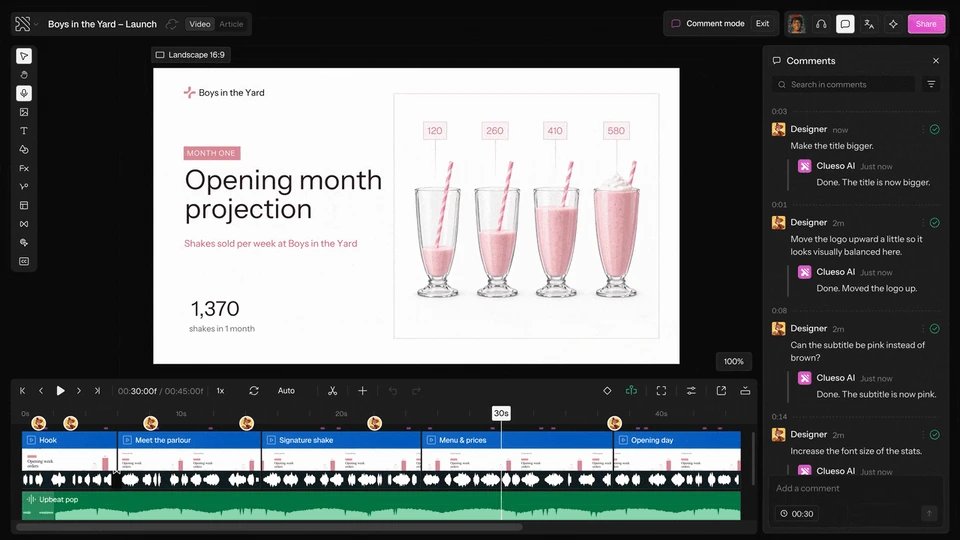
The official animation makes the workflow concrete: reviewers annotate a slide, then the editor shows comment threads with Clueso AI replies alongside the canvas. The frames reproduced here are authentic vendor demonstration media. They do not establish how reliably arbitrary requests are interpreted.
The Comments guide explains timestamped feedback, canvas areas, replies and resolved status. Clicking a comment seeks its moment. That is a useful navigation aid for review. A resolved thread is still a workflow state, not an independent check of the picture.
AN ORIGINAL EDITORIAL LAB
Change one word.
Keep the promise around it.
Imagine a fictional software launch video. Its title says “Your weekly report,” but the feature produces a monthly report. A separate call to action says “Book a demo.” The request is to correct the cadence while preserving that call to action.
Choose a review lens below. This is a fixed teaching example, not Clueso’s interface, an AI-generated result or a live editing connection. The cards illustrate the requested difference; they do not demonstrate that Clueso performed it.
FICTIONAL LAUNCH SLIDE / TEXT EXAMPLE
Your weekly report
Book a demo
Your monthly report
Book a demo
The title should say monthly.
Request: replace weekly with monthly in this title, leaving the call to action unchanged.
These original text cards show the acceptance condition, not a product screenshot.
WHAT COUNTS AS ACCEPTED?
Inspect the visible replacement.
An affirmative reply can describe the right intention while the wrong word remains on screen.
Pause at the title, read monthly in the actual frame and confirm the line still fits its layout.
Specificity makes
review cheaper.
“Fix the reporting scene” leaves several interpretations open. “Replace weekly with monthly in the selected title; preserve the CTA and timing” gives the editor a smaller task and the reviewer a clearer finish.
I would judge the pass in two parts: the required difference appears, and the unrelated element survives. A title that says monthly but replaces the CTA with “Start free” has changed the commercial promise. It is not a successful narrow correction merely because the new slide looks polished.
A USEFUL FIRST ASSIGNMENT
One scene.
One explicit boundary.
Start with a short existing video you can inspect yourself. Choose one factual text correction, one unaffected nearby element and the moment where each should appear. Keep the original version available before asking the agent to work.
The version-history guide documents previews and restoration of older project states. It also warns that operations such as AI Rewrite or Generate Speech may require version history rather than ordinary undo. Check your recovery route before a broad batch of edits.
A PROPOSED BRIEF / NOT A TEST RESULT
“In the selected launch scene, replace weekly with monthly in the title. Preserve Book a demo, its placement and the scene timing. Tell me what you changed. Leave any ambiguous request for clarification. I will inspect the frame and play the delivered video before accepting the edit.”
Accept the edit after checking the artifact.
This local review aid records your judgment; it does not inspect a Clueso project.
0 of 4 checks reviewed.
Download the scene-review worksheet
Audio deserves its own pass. Clueso’s speech-generation guide says manual script or sync-point changes require regeneration; otherwise the voiceover may not match. That does not establish which steps v2 agents handle automatically. Listen to the actual result after the agent finishes.
The product page lists MP4 export and view-only sharing. Check the version you intend to deliver. An editor preview, a resolved thread and an exported file can be three different review moments.
THE USEFUL IN PRACTICE TAKE
Delegate the production.
Keep the acceptance.
Clueso AI v2 is worth evaluating when review feedback is concrete and the work repeatedly returns to the same editable video. The appeal is not simply a first draft. It is a place where a teammate’s correction can become an agent task without moving the whole project elsewhere.
The tradeoff is interpretation. Broad instructions can produce broad changes; multiple active edits can also make cause and effect harder to inspect. Begin with a bounded correction before trusting a larger pass. Measure your own review and repair effort, not just how quickly the agent replies.
This note verifies the public release description and documentation, not editing accuracy, speed or account entitlement. Check current access in the official release before planning a trial. No price or free-plan capability is assumed here.
Keep the tool if it reduces production effort while preserving a clear path from feedback to an inspected result. Close the thread when the video meets the request. Let the reply help you find the change, rather than stand in for it.
SOURCES & METHOD
The evidence,
dated.
Published November 25, 2026. All sources accessed that date. Product capabilities are vendor descriptions; the lab and worksheet are original proposed evaluations. Official demo stills are attributed vendor media.
- Clueso v2 announcement, November 18, 2026: agent review workflow and source imagery.
- Official changelog: v2 dated November 13, 2026; comments precede the release.
- Comments and version history, current, undated documentation.
- Generating speech, current, undated documentation.
- Video product page, current, undated: inputs, editing and delivery formats.