AN AI QA ENGINEER FOR THE BUILD YOU ARE ABOUT TO SHIP
It runs.
Does it work?
Mo is Momentic’s AI QA engineer. Give it your app and a testing brief; it explores flows and returns findings with evidence. The useful part is what you can verify before the release.
By Stephen Stilwell · November 6, 2026
Independent product analysis · Documentation-led
01 / THE RELEASE PROBLEM
A successful build
is only the beginning.
For founders and product teams who can generate features faster than they can check them.
The new cart opens. The button responds. The total looks plausible. Then a customer changes the quantity, refreshes the page, and discovers that the number was never saved. A demo can look complete while the behavior underneath it is unfinished.
Mo is Momentic’s exploratory QA product: you describe what should work and give it a reachable target. The product page describes parallel test cases, functional-bug reproduction by a separate agent, and a report of findings and gaps. It supports web targets and uploaded mobile builds, with access requirements for each.
Momentic is a YC Winter 2024 company. Its existing platform includes end-to-end testing; Mo adds a prompt-driven exploration and review workflow. The distinction matters: keeping a known regression from returning and searching for a problem you did not anticipate are related jobs, but they ask different things of a tool.
The relevant audience is a small software team with a staging build, clear product expectations and someone who can review findings. Mo is less useful if nobody can explain what the app should do, supply suitable test accounts, or distinguish a bug from an intentional limitation.
This note examines the current product and primary documentation checked November 6, 2026. We did not run an authenticated Mo session or reproduce its performance claims. Interactive examples below are local editorial tools, not a connection to Momentic.
02 / LOOK AT THE HANDOFF
Not just a red flag.
A reason to investigate.
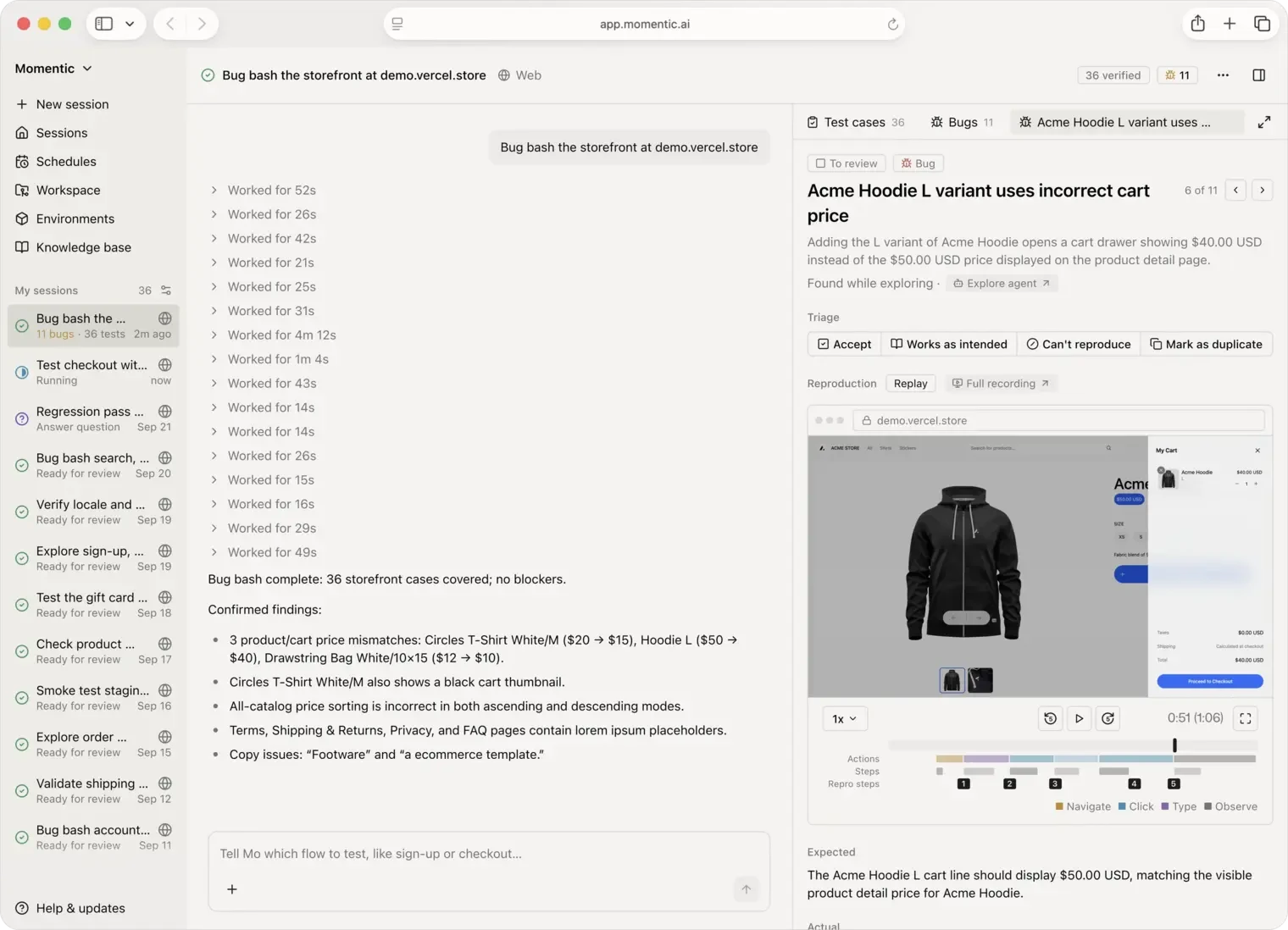
Explore the official screenshot at different levels. A useful finding connects the symptom to expected behavior and evidence someone else can inspect.
The work is visible.
The left side shows the session conversation and summarized findings. Read what was checked, then compare it with the scope you requested. A long transcript is not a coverage guarantee.
What should happen?
“The price is wrong” is incomplete. Which variant, which quantity, which displayed price, and which rule should determine the total? A reviewer needs enough context to decide whether the finding is valid.
Can someone repeat it?
The report docs distinguish reproduced functional bugs from static flags such as typos. Those are different kinds of evidence. A screenshot can establish wording; a sequence of actions may be needed to establish a broken state transition.
Did the fix change behavior?
A patch is an intervention, not the result. Deploy it to the intended target, repeat the original path, and check the relevant neighboring behavior. A passing recheck should answer the same question that made the original case fail.
03 / GIVE EXPLORATION A BOUNDARY
“Test the app”
leaves too much unsaid.
The brief guide asks for a target, scope, expectations, accounts, test data and prohibited actions. This studio turns those ideas into a concrete, editable starting point.
The brief includes a side-effect boundary. Replace the placeholders with your authorized staging details.
Target: [authorized staging URL and exact path].
Scope: cart quantities and totals.
Expect: changing quantity updates the line total and cart total consistently with the listed variant price.
After refresh: quantities and totals remain consistent.
Second case: remove one item and check the empty-cart state when none remain.
Accounts and data: [dedicated QA account]; use only records created for this run.
Prohibited: no payments, real orders, outbound messages or changes to shared data.
Report verified behavior, issues and blocked cases separately. Include expected vs actual behavior and reproduction steps. Do not infer a pass for an unfinished case.
The best first pass is deliberately small.
Choose one release-critical flow and an outcome a teammate can observe. A narrow brief makes the first report easier to audit. If it finds a problem, you can trace whether that came from a clear expectation, a good exploratory choice, or an assumption the agent made.
For a cart, the important assertion is not that “Add to cart” responded. It is that the selected variant, quantity and displayed totals stay consistent through the steps a buyer actually takes. The studio’s examples are proposed checks, not findings about any live store.
Access is part of the setup.
The quickstart requires a running target, account instructions for authenticated flows, and the relevant access for mobile builds. Local or private apps need a reachable path such as a configured tunnel. You do not need to add test files for the first exploratory session.
Use authorized test data and a suitable environment. If sign-in, a firewall or a required role prevents the flow, resolve that access problem before interpreting the report as a statement about product quality. We did not provision a Momentic account or change any deployment permissions for this review.
04 / READ THE NEGATIVE SPACE
A blocked case
is not a pass.
Three authored cases, three different meanings. Select an outcome to see what the release decision still needs. These are teaching examples, not Mo output.
Quantity changed. Total matched. Refresh preserved it.
This supports the requested behavior under the exercised conditions. It says nothing about untested discount rules, currencies or account types.
Momentic’s reports use these verdict categories and record checked behavior alongside remaining gaps. Review the case detail, not only the session headline.
THE REPORT IS NOT THE WHOLE WORKFLOW
A finding still needs
a product decision.
According to the triage docs, a finding begins in Needs review. Reviewers can confirm it, record a fix, or dismiss it with a reason such as expected behavior, inability to reproduce, or duplication. When behavior is intentional, the dashboard can suggest a knowledge entry for review.
That review step is valuable. An agent may encounter a disabled action that is correct for a viewer account. The useful response is to explain the permission rule, not to “fix” the UI by exposing the action. A reviewable record preserves the product’s intent.
Our Mirrors Field Note examined how corrections can be scoped to the behavior they should affect. Mo’s triage raises a similar practical question: does the explanation help the next run recognize intended behavior without concealing a genuine regression?
Export is not the same as an offline replay.
The report documentation describes exported findings, verdicts and triage records. Exporting before a session finishes can yield a partial report. Browser replays are not automatically converted into MP4s or supplied with an offline player; replay access may still depend on the Mo session.
For a coding-agent handoff, check that the recipient can open the evidence. Preserve the original report before a fix, then compare it with the recheck. Review recordings and logs for sensitive data before sharing them. A broken evidence link turns a potentially useful finding back into a story someone must investigate from scratch.
Momentic’s QA Bench publishes an evaluation around real bugs in four open-source web applications. It gives readers a more inspectable basis for discussing exploratory QA than a single polished demo. It is still a benchmark published by the vendor.
Two questions matter together: how much of the known problem set an agent finds, and how much of what it reports is actually a problem. A tool can look productive while burdening reviewers with false alarms. Conversely, a cautious tool can produce clean-looking reports while missing important failures.
For your pilot, measure useful confirmed findings, missed seeded regressions, time to reproduce, and reviewer effort. Do not transfer a leaderboard score directly to your app. Different account states, data, integrations and business rules can change what is observable and what counts as correct.
05 / THE DECISION
Give your next build
a harder question.
Explore Mo ↗Independent coverage. No affiliate link.
Mo is worth evaluating when a team has a real build, a specific release risk and too little time for exploratory checking. The compelling part is the path from a plain-language brief to findings a developer can review and recheck.
It complements an existing regression suite. A repeatable test protects known behavior; an exploratory pass can search beyond the cases you already encoded. Keep the important discoveries as durable tests where appropriate, rather than relying on each new exploration to rediscover them.
My preferred pilot is one authorized staging flow with a known regression and a few deliberately tricky states. Judge the report against those expectations. Can the team reproduce the important findings? Does the report expose access gaps? Does the recheck establish that the fix worked?
Do not interpret Mo’s parallel agents, official demo counts or benchmark as a guarantee of complete coverage. Physical-device behavior, subjective usability and your own product requirements still need appropriate human and technical review. We have not measured Mo’s reliability or cost per useful finding firsthand.
Before purchase, confirm current Mo availability, plan limits and how your intended sessions are billed. We have not included an unverified price or promised savings. The decision is whether the complete workflow helps your team catch consequential mistakes with evidence it can trust.
SOURCE DESK / ACCESSED NOVEMBER 6, 2026
What this note rests on.
The interface image is official Momentic media, optimized locally without changing its content. Magnification uses the same image. Briefs and coverage examples are original editorial tools. No authenticated session, generated screenshot, invented bug or performance measurement is presented as real.